 Anshuman Sharma
some stories are better told together.
When Jane Chen and Wei Li reached out to me, I knew this would be the kind of project I take on: challenging, new, and, of course fun. The initial pitch was simple: let's build a voice-based app to help seniors storytell. Our collaboration was nothing like I had ever experienced before. They pushed me hard to explore uncharted paths that usually led to a better solution to the problem we were trying to solve.
see it live → livestotell.comIn informal sessions, prompted storytelling appeared to spark memory recall in seniors with Alzheimer's and dementia.
RecallVoice-first so ability and age don't gate participation.
AccessibilityThree ways to tell a story together, one simple flow.
Togethernessthe help was there. nobody could use it.
Most families have someone with a lifetime of stories and no easy way to record them. Distance, age, ability, and hearing all get in the way, and the newest tools are built for people who are young, fluent, and comfortable with tech, not for families who need the most help. The stories exist. They just stay untold.
Before LivesToTell hired a product design team, a beta release of the new platform had been implemented based on blue-sky concepts. These mockups were created without any usability testing and had little consideration for the technical and product limitations of the scope of work.
I conducted research interviews with our primary demographic, older adults aged 50 and up, to uncover the pain points they were experiencing with the beta release.
My research encompassed:
- Understanding the user goal and needs
- Uncovering pain points with the existing user journey
- Prototyping ways for seniors to interact with the AI copilot
- Developing formats for users to storytell together asynchronously and in person
solving a systemic issue
Helping seniors record memories is a band-aid fix and the real gap isn't that stories go unsaved. It's the systemic problem that families have drifted apart, and moments that should preserve those stories rarely happen.
The opportunity was in bridging that distance and capturing oral tradition in the same act
Distance
Seniors and family members live far apart, so there's little natural occasion to sit down and share
No clear next step
Seniors stall without guidance as memories are non-linear and require prompting to keep a thread going.
Gamification for seniors
Documentation falls 1-sided. Seniors already know their own stories. The incentive isn’t archiving, it’s telling it to someone who hasn’t heard it yet.
To address these missing points in our initial design, I pitched Tell It Together, an in-app feature that would allow seniors to document their stories live with a secondary users or asynchronously on their own time.
Design Process
Our process at LivesToTell is based on the Double Diamond Theory and Lean UX process. I also took inspiration from Nir Eyal's Hooked: How to Build Habit-Forming Products. We aim to incorporate the key phases of Discovery, Definition, Ideation and Implementation in all of our projects.
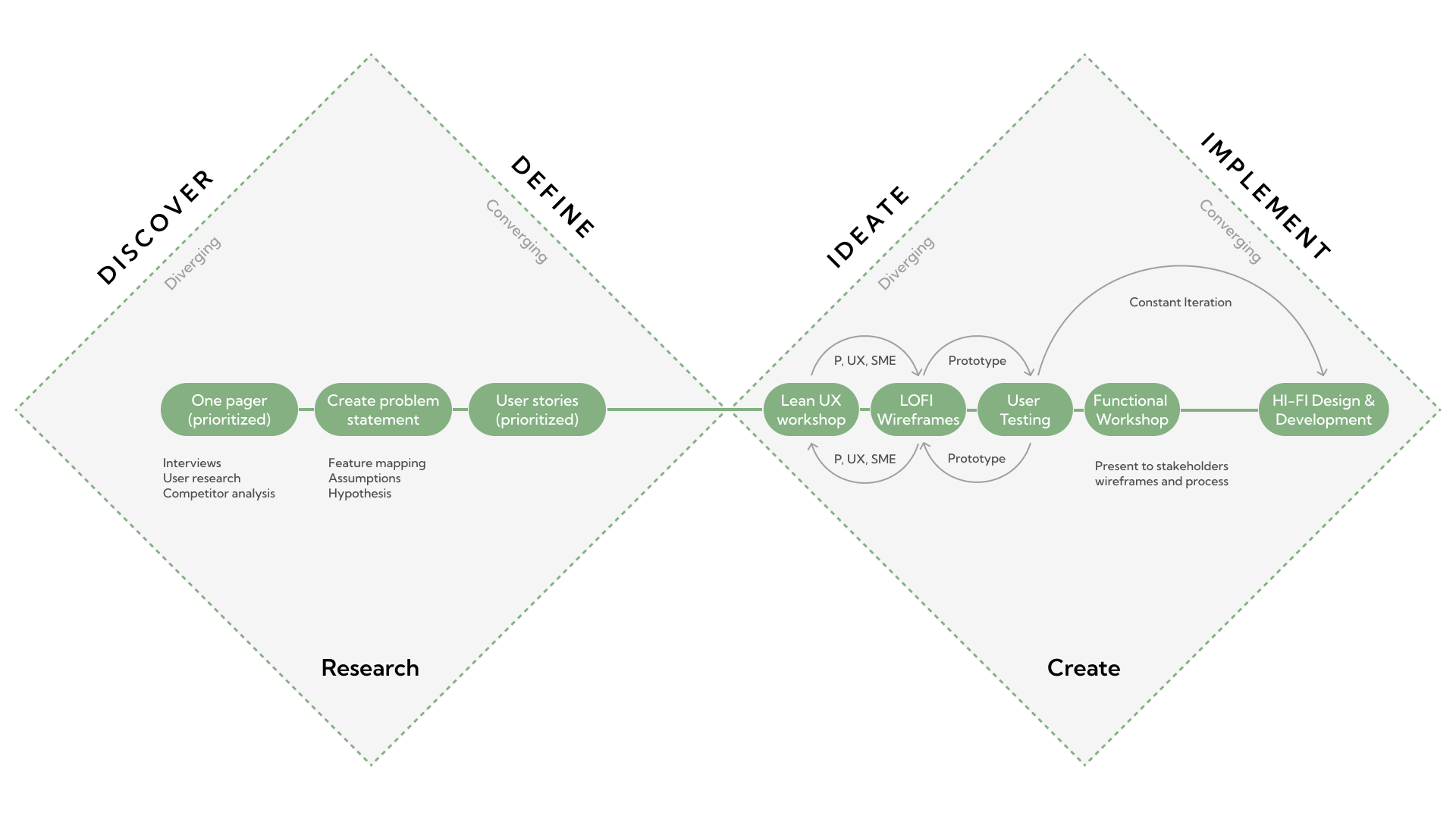
Design Framing
Subscription-based products do not get second chances easily. If someone feels confused or exposed, they hesitate, causing unnecessary friction.
We started with what people were already doing. For most seniors, communication is still phone-first. We needed to design a product that would feel familiar, but also help them do something new.
I relied on a data-driven approach known as the severity framework to inform my process and list usability issues in order of priority. The framework helps to identify the severity score of a usability issue based on the following variables.
Task criticality x impact x frequency = severity
- Task criticality - how important is the task to the user? (1 = low, 5 = critical)
- Impact - how much of an impact does this issue have on the user's task? (1 = suggestion, 5 = blocker)
- Frequency (%) - how many times does this come up out of total participants?
| # | Theme | Issue | Crit. | Impact | Freq. | Severity | Solution 1 | Solution 2 | |||||||||||||||||||||||||||||||||||||||||||||||||||||||||||||||||||||||||||||||||||||||||||||||||||||||||||||||||||||||||||||||||||||||||||||||||||||||||
|---|---|---|---|---|---|---|---|---|---|---|---|---|---|---|---|---|---|---|---|---|---|---|---|---|---|---|---|---|---|---|---|---|---|---|---|---|---|---|---|---|---|---|---|---|---|---|---|---|---|---|---|---|---|---|---|---|---|---|---|---|---|---|---|---|---|---|---|---|---|---|---|---|---|---|---|---|---|---|---|---|---|---|---|---|---|---|---|---|---|---|---|---|---|---|---|---|---|---|---|---|---|---|---|---|---|---|---|---|---|---|---|---|---|---|---|---|---|---|---|---|---|---|---|---|---|---|---|---|---|---|---|---|---|---|---|---|---|---|---|---|---|---|---|---|---|---|---|---|---|---|---|---|---|---|---|---|---|---|---|---|---|
| 1 | Recording | Recording alone feels awkward — users freeze up and don’t know what to say | 5 | 5 | 86% | 21.43 | Frame it as answering a prompt, not “record” | Offer Tell It Together so someone is listening | |||||||||||||||||||||||||||||||||||||||||||||||||||||||||||||||||||||||||||||||||||||||||||||||||||||||||||||||||||||||||||||||||||||||||||||||||||||||||
| 2 | Community | Privacy anxiety — users assume the worst about who can see their story | 5 | 5 | 86% | 21.43 | Private by default; explicit per-story visibility | Plain-language labels (Only me / Family / Public) | |||||||||||||||||||||||||||||||||||||||||||||||||||||||||||||||||||||||||||||||||||||||||||||||||||||||||||||||||||||||||||||||||||||||||||||||||||||||||
| 3 | Accessibility | Small buttons and light-gray text are hard to see for older users | 5 | 5 | 86% | 21.43 | Large type + high-contrast theme by default | User-adjustable text size menu like Kindle | |||||||||||||||||||||||||||||||||||||||||||||||||||||||||||||||||||||||||||||||||||||||||||||||||||||||||||||||||||||||||||||||||||||||||||||||||||||||||
| 4 | Tell It Together | Families are never free at the same time to record together | 5 | 5 | 86% | 21.43 | Pen Pal async prompts answered anytime | Scheduled calls with secondary users | |||||||||||||||||||||||||||||||||||||||||||||||||||||||||||||||||||||||||||||||||||||||||||||||||||||||||||||||||||||||||||||||||||||||||||||||||||||||||
| 5 | Drafting | Users fear the AI will rewrite their story in a voice that isn’t theirs | 5 | 5 | 71% | 17.86 | Copilot suggests, never auto-applies; preserve wording | “Keep my words / just fix grammar” toggle | |||||||||||||||||||||||||||||||||||||||||||||||||||||||||||||||||||||||||||||||||||||||||||||||||||||||||||||||||||||||||||||||||||||||||||||||||||||||||
|
|||||||||||||||||||||||||||||||||||||||||||||||||||||||||||||||||||||||||||||||||||||||||||||||||||||||||||||||||||||||||||||||||||||||||||||||||||||||||||||||||
the situation decides the feature.
Context: Families want to stay connected, but conversation across generations is hard. Seniors often live far from their grandchildren, and even when everyone’s in the same room, the distance still shows. Neither side is sure what to ask or what to share, and a moment that should feel close ends up feeling awkward instead. What families were missing was a reason to sit down together.
Primary Problem: Seniors crave relationships and connection to family
Secondary Problem: Seniors need an incentive to continue recording and publishing their memories
Every family fell into one of three situations, so Tell It Together needed to bend into three matching features:
In person → Round Robin
Same place · liveThe family is together in one room. One phone starts recording and the mic passes from person to person, each turn recording on their own device. Best for holidays and visits — it turns a normal gathering into a saved story with almost no extra effort.
Remote → Call
Apart · liveThe family is in different places but free at the same time. They record together over a video or audio call, with audio required and video optional. Best for relatives spread across cities who can still find a shared hour — the closest thing to being in the same room.
Asynchronous → Pen Pal
Apart · anytimeThe family is apart and never free at once. A family member sends a question; the storyteller records an answer whenever they’re ready. Best for the hardest case — it removes the “we’re never all free at the same time” wall entirely.
With these three scenarios defined, I began wireframing a shared pattern that could flex across all three.
Wireframing the solution
I mocked up basic wireframes to gather feedback from Product, Engineering, and our senior user panel on the overall layout and structure for each mode of Tell It Together.
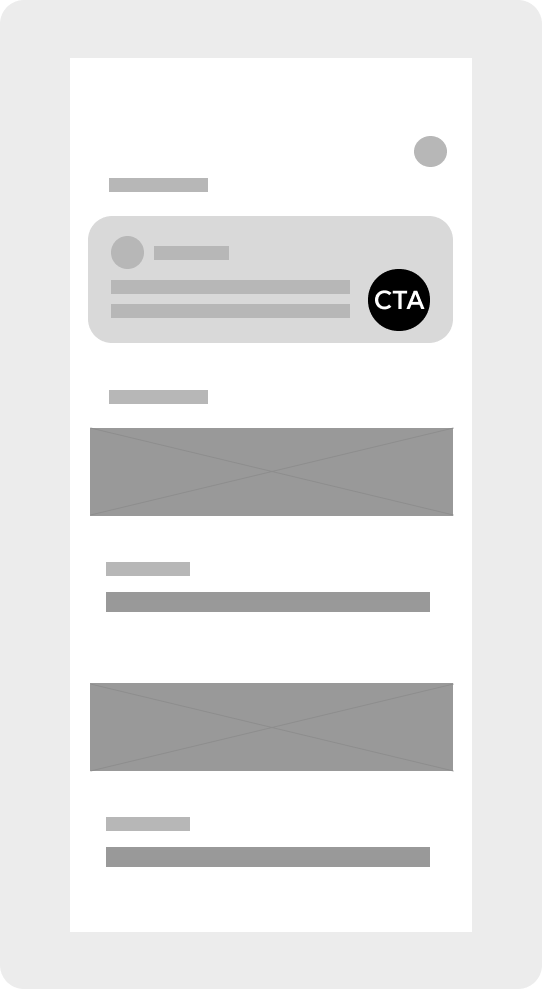
Embed most recent prompt directly into the home with CTA
Pro: Highest visibility
Con: Only room for a single prompt, risks crowding the home feed
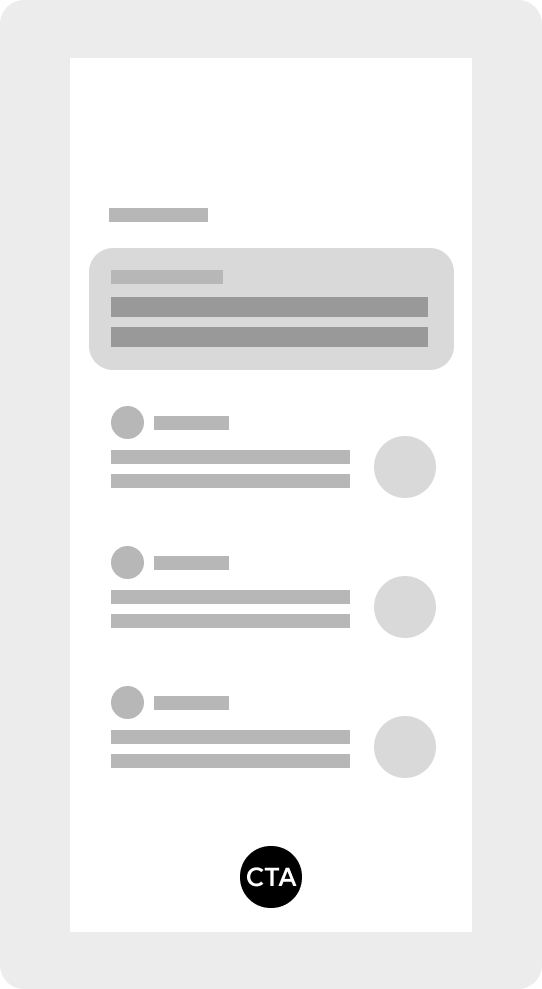
Embed feature in an unlisted page with all prompts
Pro: Full prompt visibility; low effort to build
Con: Discoverability is weak — unlisted page means many users never find it

Embed feature in an unlisted page with all prompts and its own navbar
Pro: Dedicated space with its own navbar feels like a full, scalable feature
Con: More dev work, unlisted so discovery stays a problem

Embed feature in a listed page with prompts shown one by one
Pro: Discoverable (listed), and focused view prevents cognitive overload
Con: Slower to browse, more interactions required
Although each concept explored different IA possibilities, I decided to focus on a combination of panels 1 and 2, reducing visual clutter and cognitive load while staying mindful of resource constraints. Limiting changes within the panel made it more feasible to implement by minimizing engineering effort and cost compared to a full-page overhaul. With that, I landed on this iteration: